Augos Factory / How it works / Data you can check
Data you can check
Every number starts on your line.
The sensor counts every unit and times every stop, and every total opens to the events behind it. Speeds, product units and costs are your settings; we check them with you at go-live and every quarter against what the line actually did.
Five principles
Measured on the line, checked with you, never hidden.
| Principle | What you see |
|---|---|
| Measured, not estimated | Counts, run time and stops come straight from the line, timestamped. Every total opens to the events behind it. |
| Your settings, checked with us | Rated speeds, units per product and the cost rate appear as "your settings", with the date each was last verified. |
| Above 100% is shown, not hidden | Speed above the rated speed is reported as measured, never capped to look tidy. Speed and interruptions (short stops) are reported apart, so one cannot hide the other. It means the line ran faster than its rated speed, and the difference is reported as a speed gain. The rated speed is not raised to match. |
| Verified at go-live | A manual count against the system over one run, signed off by the plant. |
| Checked every quarter | Rated speeds and product units are a standing item in your review with us. Each line's true speed and any speed gain are on the table. |
When a line beats its rated speed
Above 100% is news, not an error
A speed above 100% means the line ran faster than its rated speed. The platform shows it as measured, and the counts behind it stay untouched. Because speed is reported apart from interruptions, a fast line cannot hide behind its stops, as it can in a blended performance figure. The rated speed stays at the capacity you paid for, the nameplate rate for each product. A line that runs faster shows a speed gain above 100%, not a new, higher rated speed. At go-live and every quarter, Augos sets the true speed the line actually held beside its rated speed, so the gain is on record. Any change to a rated speed is a dated change in the worksheet, agreed with you, and never automatic.
One line, 30 days: true speed against its rated speed
Illustrative| 30 days | |
|---|---|
| Units counted measured · unchanged | 2,419,200 |
| Run time measured | 360 h |
| Rated speed your setting · nameplate | 100 / min |
| Speed against rated speed | 112% |
| Speed gain, reported apart from interruptions | +12% |
| OEE, speed gain included | 87.8% |
Illustrative stop data, not a customer.
Pending Inputs
How complete is the record this week?
Pending Inputs shows how much time is still missing a stop reason, a product or a signed-in operator. It measures the record, and it belongs to the manager. It is not a score on operators.
Every stop still waiting for a reason lands on a worklist, ranked by hours, so the gaps are visible and nothing quietly drops out.
This week
Illustrativeof stop time explained
Illustrative stop data, not a customer.
If you are not sure about the data
You don't have to trust anyone. The record is built so you can check.
| The worry | What the system does | In a sentence |
|---|---|---|
| Numbers will be fudged | Start, stop, interruptions, duration, count and speed come from the sensor with digital timestamps; nobody on the floor can change them | "The line keeps time. Operators only name the stop." |
| Reasons will be wrong | Reasons are picked from the plant's own list at the moment of the stop; supervisors can reclassify, and the original stays on record | "Operators identify why, with a stop reason." |
| Stops will go unlogged | Every unexplained stop lands on a worklist, ranked by hours | "Nothing disappears; unexplained stops are listed." |
| Unplanned passed off as planned | A stop's category, planned or unplanned, changes only with a supervisor's or site admin's approval, and the change stays on record; shift records lock at close | "Nothing changes without a trace." |
| Busy operators won't keep up | Jobs can arrive preloaded from the ERP | "A tap, not a form." |
The record protects good line teams as much as it informs managers. "Waiting for material" and "no air" are on record with their times. A team is no longer blamed for a stop it did not cause. When teams see that, stop reasons become more complete and more accurate.
Check it yourself
Every setting change, dated and agreed
The change log keeps the go-live count, the quarterly check and every change to a setting, with who agreed it.
Rating and settings change log
The go-live count, the quarterly check and every agreed change to a setting, dated.
Download (Excel) ›
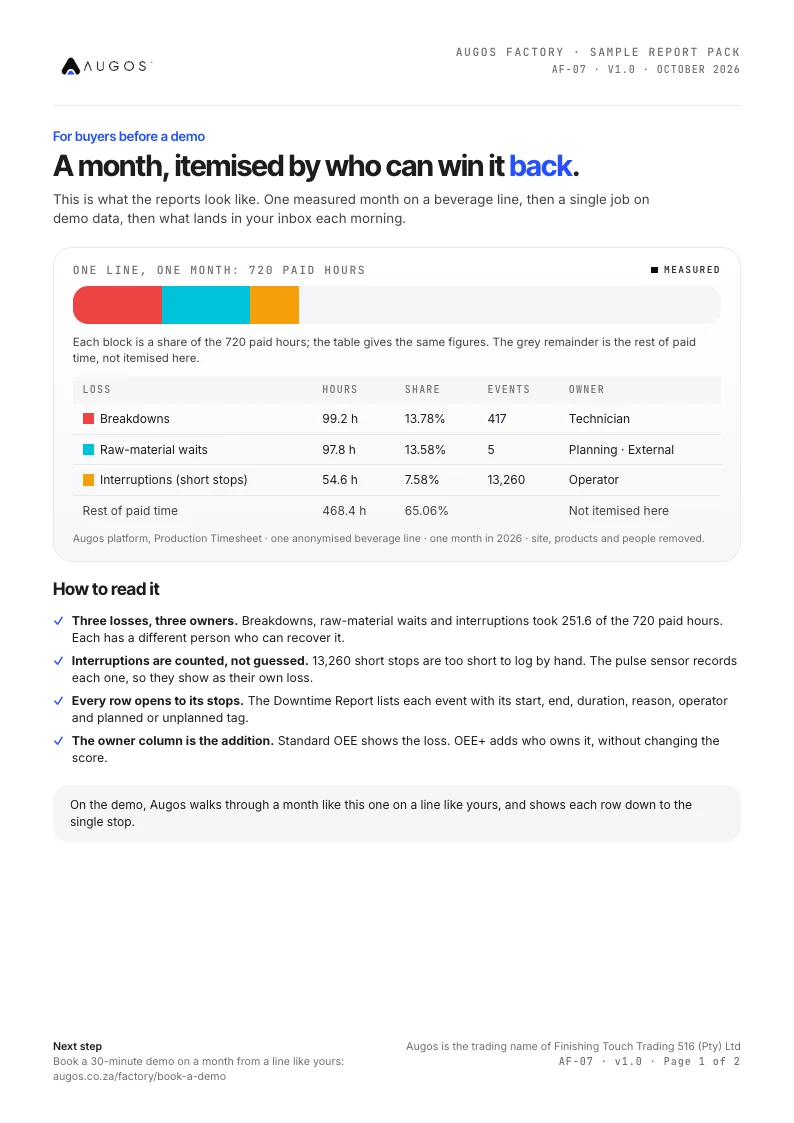
Sample report pack
One measured month on a beverage line, one job on demo data, and what arrives each morning.
Download (PDF) ›
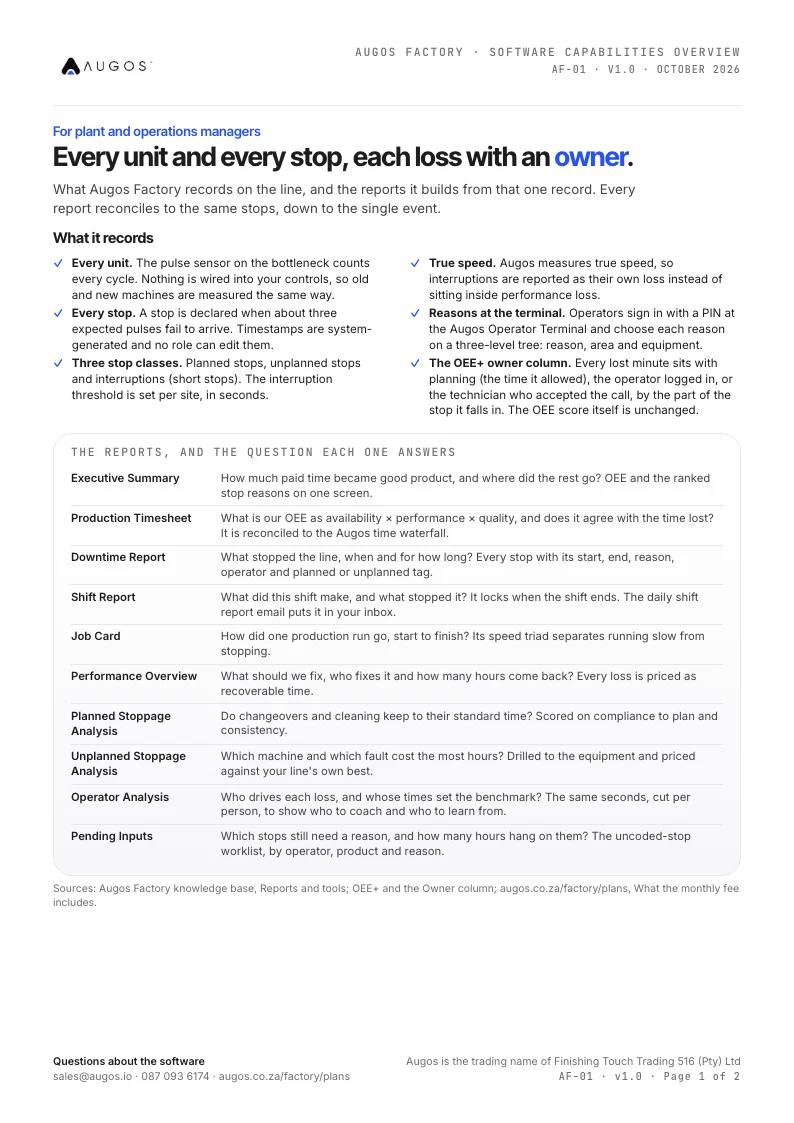
Software capabilities
What Augos Factory records, the ten reports it builds, and how your data leaves the platform.
Download (PDF) ›
Questions
Trust, answered
What happens when a count looks wrong?
We check the setting behind it with you. A hand count tests the sensor and the units per product. The rated speed is checked against the nameplate rate for that product. The measured counts and timestamps are never edited; a setting is changed with you, as a dated change in the worksheet.
Can a supervisor change what happened?
A supervisor can reclassify a reason. The original reason, the change and who made it stay on record. Durations and counts cannot be changed.
Who sees operator-level data?
Each operator is compared by name against the line's own best, so supervisors know who to coach on which task. Operator data is personal information under POPIA, and access is set by role. Read the shop-floor charter ›
Check it on one of your own lines.
The three-month paid pilot starts with a hand count against the system and ends with a written success test, reviewed on day 60.
- A hand count against the system at go-live
- Every stop timestamped and listed
- R34,350 ex VAT for the first three months
A manufacturing specialist replies within two business hours to set a 30-minute call.