Augos Factory / How it works
How it works
The line keeps time. Operators only name the stop.
One count sensor on the bottleneck and one Augos Operator Terminal beside the operator. The sensor records every unit and every stop. The terminal asks for the stop reason.
From R4,950 per line per month, ex VAT · three-month paid pilot ›
The shift's lost minutes, by who can win them back.Lost this shift: 5.0 h
- Technician 2.1 h
- Operator 2.0 h
- Planning 0.9 h
Illustrative line, not a customer. Stop reasons as the operator names them, owners as the Augos platform attributes them.
- 1The sensor times the stop. The timer counts from the moment the line stopped.
- 2The operator names it. A few taps, from the plant's own list.
- 3It gets a name. The operator logged in, the technician who takes the call, or the time the plan allowed: by the part of the stop each one held.
In short
A count sensor records every unit, run and stop on the line with digital timestamps. The operator assigns each stop a reason on the terminal. Augos Factory turns the two into a paid-hour record of planned stops, breakdowns, interruptions (short stops), and speed and quality losses. Each is shown in hours and as a share of paid time. Net production time is also shown in rand.
What gets recorded
Measured on the line, explained by the people on it.
| Record | Comes from | Who can change it |
|---|---|---|
| Units, run time, stops, interruptions, speed | The count sensor, with digital timestamps | Nobody |
| The reason for each stop | The operator, from your own list | Supervisors can reclassify; the original stays on record |
| Product, job and operator | Sign-on at the terminal, or a job sent from your ERP | The plant |
| Planned stops: changeovers, cleaning, breaks | The operator picks the planned category; the stop comes from your settings | Supervisors can reclassify a stop as planned or unplanned |
| Rated speeds, product units, sales values | Your settings, verified with Augos at go-live and every quarter | The plant's administrator |
Interruptions
Interruptions are where paper logs go blind.
One week of stops on one line
A jam cleared in forty seconds never reaches a shift log.
Over a hundred of them in a shift add up to more than the breakdown everyone remembers. The sensor times every one.
were interruptions
went to interruptions
Every stop is timestamped, however short. Your stop threshold only decides which stops ask the operator for a reason. The shorter ones are counted and timed automatically.
We agree the threshold with you against the line's cycle time. So interruptions are neither hidden nor mistaken for slow running.
One week of stops on one line
MeasuredIn the Downtime Report's reason tree, every stop drills down to its station and its fault, each with a count and a time.
Augos platform, Downtime Report · one anonymised line · one week in 2026 · site, products and people removed.
The paid-hour record
Every paid hour, accounted for.
The record starts from paid time, not planned production time. So the losses around the line show up too.
Changeovers, cleaning, waiting for material, full bins downstream and idle time all count. Each loss is shown in hours and as a share of paid time.
Every stop sits in a reason tree your team sets up once. Go as deep as you need: reason, machine, assembly, component, part.
The timesheet below adds up to paid time at every level. Open any row down to the event log behind it.
One month on one line
IllustrativeProduction timesheet
Datahound Pet Foods, demo plant · Line 1 pouch filler · Day 1 to Day 30
Show the numbers as a table
| Account | Time | % of paid time | Stops |
|---|---|---|---|
| Paid time | 720h 0m | 100.00% | |
| Stoppages | 280h 3m | 38.90% | 2 437 |
| Planned | 118h 47m | 16.50% | 374 |
| Cleaning | 48h 26m | 6.73% | 90 |
| Changeover | 32h 44m | 4.55% | 106 |
| People | 23h 47m | 3.30% | 90 |
| Quality | 13h 50m | 1.92% | 88 |
| Unplanned | 130h 17m | 18.10% | 415 |
| Breakdown | 84h 15m | 11.70% | 349 |
| Waiting | 29h 57m | 4.16% | 29 |
| Quality | 6h 30m | 0.91% | 7 |
| People | 5h 30m | 0.76% | 7 |
| Pending | 4h 5m | 0.57% | 23 |
| Interruptions | 30h 59m | 4.30% | 1 648 |
| Speed loss | 38h 33m | 5.35% | |
| Variance | 5h 7m | 0.71% | |
| Net production time | 396h 17m | 55.04% |
Illustrative month on demo data, not a customer. Recreated screen of the Augos platform Production Timesheet; Datahound Pet Foods is an illustrative plant. Times run Day 1 to Day 30; stops of 5 minutes or longer carry a reason.
Who can win it back
Every lost hour traces to its root, and to who can recover it.
Open any stop from the reason to the machine, assembly, component and part, down to the event log. Each hour is measured against the line's own best, not a textbook 85%.
Who owns a lost minute depends on the part of the stop it falls in, not on the stop reason. Nothing is set per reason in your workbook. The time the plan allowed for a planned stop sits with planning. The overrun, and the evaluation and resolution of an unplanned stop, sit with the operator logged in. Response and repair sit with the technician who accepted the call, with Augos Assist. Interruptions are an account of their own, traced to the operator and product.
A department is the roll-up of the people measured: operators to production, technicians to the technical team. Recoverable hours are worked out for the person, the event, the job and the product.
In the knowledge base this is the Augos method, OEE+: standard OEE with an owner on every lost minute.
One line · one month · the three biggest losses
Measured- Breakdowns
- 99.2 h
- Raw-material waits
- 97.8 h
- Interruptions
- 54.6 h
- Lost to the three, of 720 paid hours
- 251.6 h
Augos platform, Production Timesheet · one anonymised beverage line · one month in 2026 · site, products and people removed.
What you open each morning
The reports, in plain words.
Report names below are the names on your screen. Each opens its guide in the knowledge base.
Executive Summary
The line or site on one screen: OEE, output against target and the biggest losses.
Production Timesheet
Where the hours went, interval by interval, from paid time to net production.
Downtime Report
Every stop, ranked by hours, with its reason and the operator signed in.
Performance Overview
Losses by department, with the recoverable hours against your line's own best.
Planned Stoppage Analysis
Changeovers and cleaning against standard: the standard and the overrun, separately.
Unplanned Stoppage Analysis
Each breakdown, drilled to the machine. Maintenance calls, an optional extra, add the five Stoppage Response Stages.
Shift Report
The locked record of each shift, emailed when the shift ends to the people who run the meeting.
Pending Inputs
Time still missing a stop reason, a product or a signed-in operator, ranked by hours, so nothing hides.
Getting started
One line at a time, live within 48 hours.
Live within 48 hours of your kit arriving. Fill in one worksheet, give us a power supply by the bottleneck and mount the sensor. We switch it on over the air. Operator training follows.
- 1
Fill in one workbook
Products, stop reasons, operators. That is the whole of the data set-up. Download the setup workbook (Excel) ›
- 2
Prepare the line
A power supply near the bottleneck. 4G is built into the terminal and we supply a data SIM at no cost, so it stays off your plant network. Ethernet or Wi-Fi also work, with your IT team's sign-off.
- 3
Mount, then we configure
Your team mounts one sensor on the bottleneck and the terminal beside the operator, in its stainless steel enclosure, with our guidance. We load your workbook over the air.
- 4
Two days of training
Operators learn five things on the terminal: log in, pick the job, see an interruption, give a reason, end the job. Supervisors learn the reports.
- 5
First ranked losses within days
Recommended times and recoverable hours for each stop reason follow once it has at least 10 events. Frequent stops qualify within days; rare ones take longer.
Training your team
Two days on site, after go-live.
Operators learn on their own terminal, with a printed guide, a card at the line and a signed checklist.
From the line
What operators say
"It makes the job easy and lets you track your daily work."
"It makes operating very easy. We are able to record production without worrying about mixing production, or production getting lost (so far so good)."
Operator survey, October 2026. Operator and company anonymised with the client's consent.
Works with what you have
Jobs in from your ERP, data out to your tools.
In
Your ERP
Scheduled jobs sent to the terminal through the Augos API, so operators pick a preloaded job. Your ERP pulls job results back. One South African food group already sends its scheduled jobs to the terminal this way.
ERP job integration ›Beside
Your CMMS
Breakdown history per machine and fault, beside the work orders your maintenance system already holds.
Out
Your analysis
Excel, CSV, JSON and an open REST API. Your data stays yours.
Your data
Documents
Set-up and installation, in writing.
Setup workbook
Lines, products, stop reasons, operators and shifts. The whole of the data set-up.
Download (Excel) ›
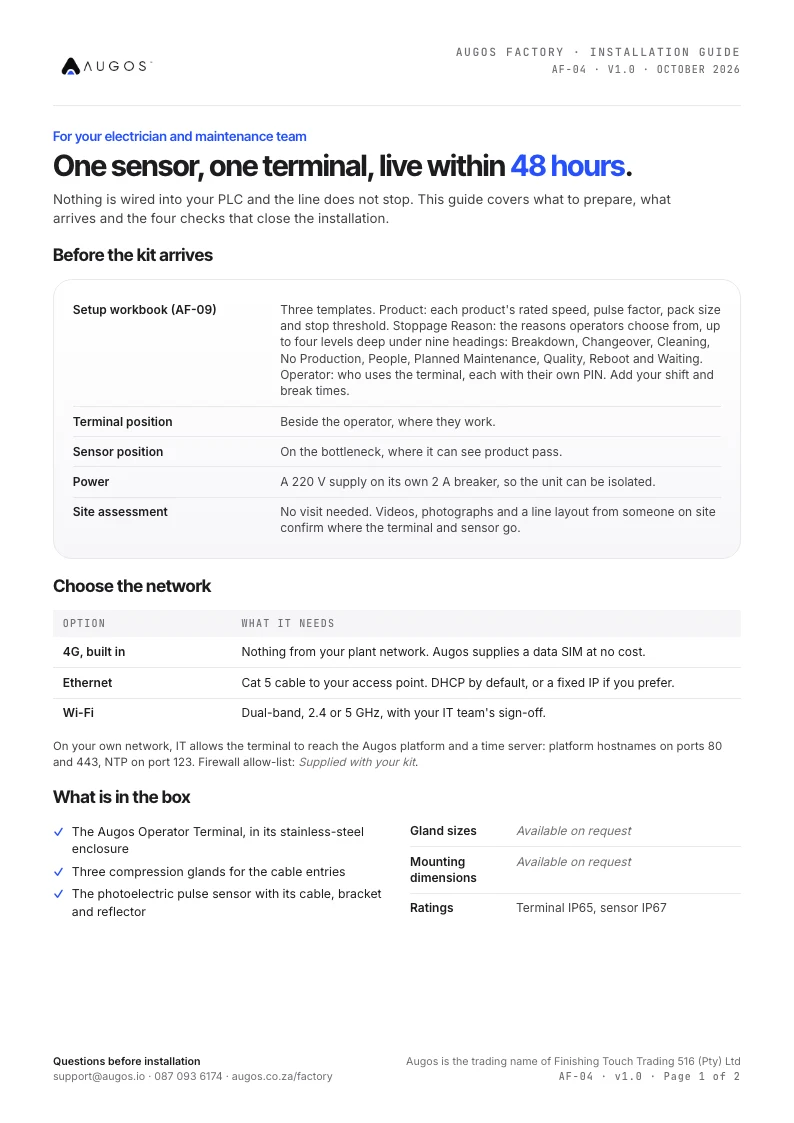
Installation guide
What to prepare, what arrives, the four installation steps and the acceptance checks.
Download (PDF) ›
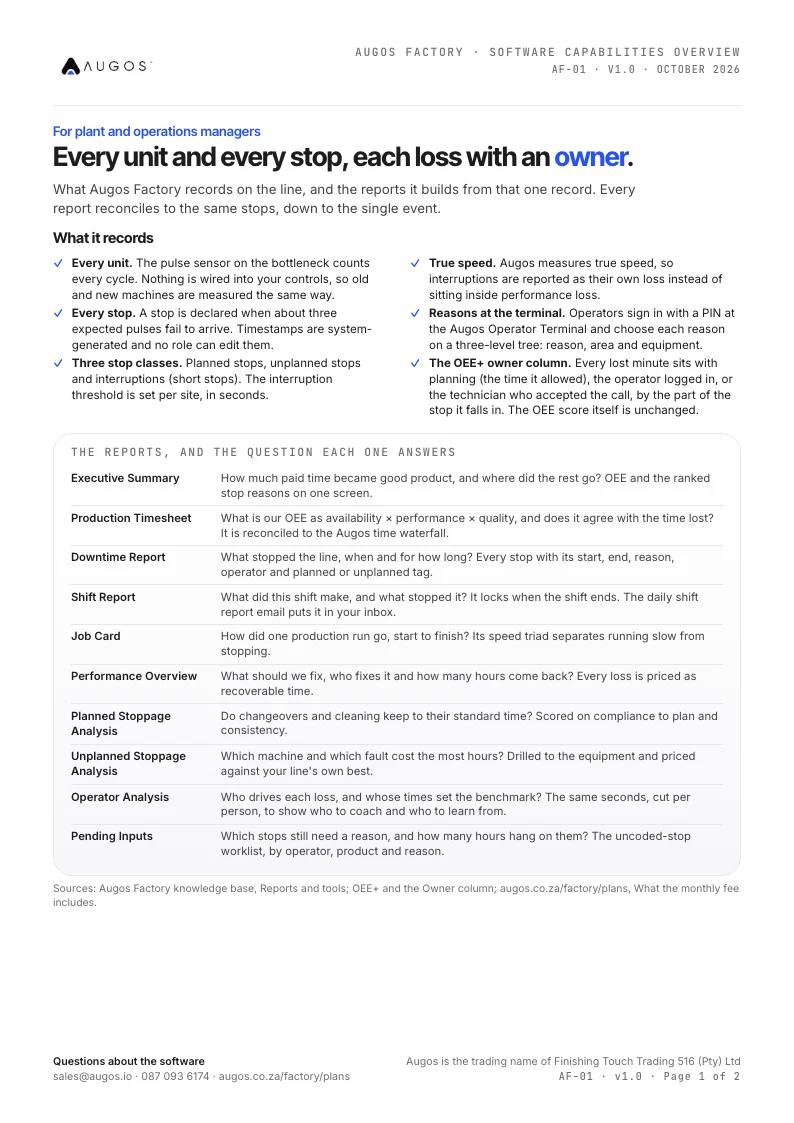
Software capabilities
What Augos Factory records, the ten reports it builds, and how your data leaves the platform.
Download (PDF) ›
Questions
How it works, answered.
What exactly does an operator do?
Five things on the terminal: log in with a PIN, pick the product or job, and see an interruption logged without a code. Then give a reason when a stop asks for one, and end the job. No paper.
Do we need to connect it to our PLC or SCADA?
No. It needs a power supply near the bottleneck and a count sensor on it. Counts, runs and stops come from that sensor, so no machine programming is involved.
How soon will we see something useful?
A ranked list of losses within days of go-live. Benchmarks for each stop reason need at least 10 events, so frequent stops qualify first.
What is an interruption?
A stop shorter than your stop threshold: counted and timed automatically, without asking the operator for a reason. Longer stops ask for one.
Go deeper
The pages behind this one.
How losses are valued and benchmarked, what is measured and what is a setting, how your team learns the terminal, and the reference version of every report.
See it on one of your lines.
Thirty minutes with a manufacturing specialist, using your products and stop list.
- The terminal, the record and the reports
- What your install would need
- Prices in rand, ex VAT, per line
A manufacturing specialist replies within two business hours to set a 30-minute call.