Cost allocation
1 · The purpose of this report
Cost allocation is your custom tool for dividing utility spend. However your organisation needs to split a shared bill, between departments, production lines, floors or cost centres, the allocation can be set up to match. Each receiving point is an allocation point, and the basis it's split on is the allocation method: by measured consumption, by a fixed percentage, by a rule such as shift or occupancy, or a mix of these across different parts of the cost.
Where sub-metering is in place, allocating by measurement reflects what each point actually used, which is a more defensible basis than an equal or fixed-percentage split. Where it isn't, percentage or rule-based allocation gives a structured approximation until the metering is there.
The module isn't on by default. The allocation logic is configured for you by the Augos team to match how your organisation divides its costs, so only points set up for allocation appear in the selector.
2 · On the page
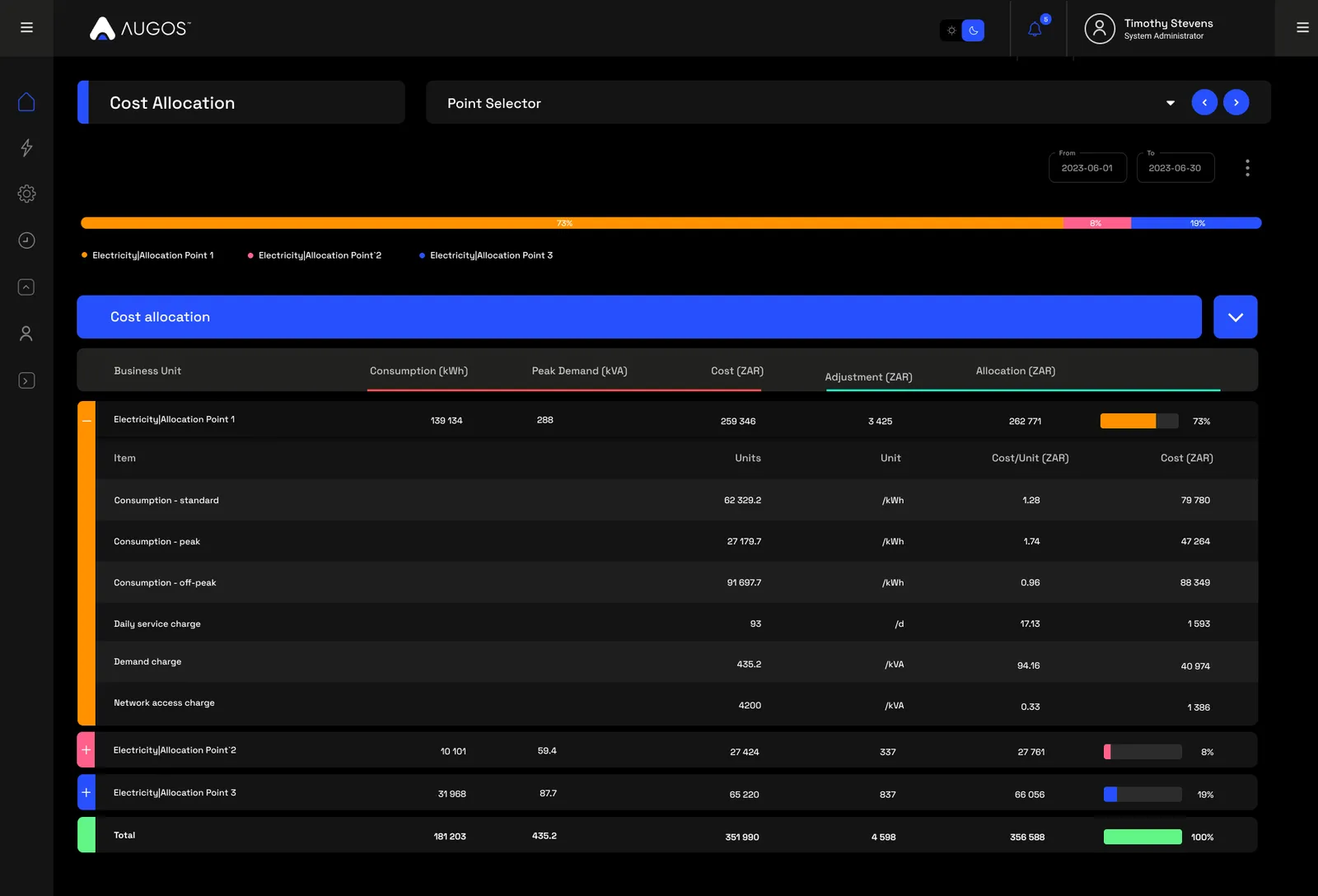
The page is a chart over a table, for the point and period you select.
2.1 · Selectors and menu
| Control | What it does |
|---|---|
| Point selector | Only points set up for allocation appear here. Standard measurement points don't. |
| Date selector | A full calendar month, or a billing period that matches your utility account. Billing periods are created on the Bill verification page and then appear here. |
| Three-dot menu | Open the data-download window, or download a Cost allocation PDF for the point and period. |
2.2 · The allocation chart and table
A bar at the top shows how the total cost is split across the allocation points for the period, each point a coloured segment carrying its share. Below it, the table lists every allocation point with its consumption (kWh), peak demand (kVA), cost, any adjustment, and its final allocation. An adjustment is a correction applied to a line, manual or system-generated, so an allocation can be trued up where it needs to be. Each point expands to the tariff line items behind its cost: units, unit of measure, cost per unit and total.
3 · Use cases
- Recharge shared costs. Turn one utility bill covering several departments or cost centres into a per-point cost finance can recharge, on a basis everyone can see.
- Hold areas accountable. Each line, department or floor gets its own cost for the period, at the level where the decisions are made.
- Find what's driving an increase. The table breaks cost down by point and by tariff line item, so you can see which unit grew and on which charge.
- Allocate without sub-metering. Where meters aren't in place yet, percentage or rule-based allocation gives a structured split until they are.
4 · Exports
- AI-ready (JSON). The allocation per point, with consumption, peak demand, cost, adjustment and final allocation. Feed this period and the last to an AI agent and ask which points grew their share. More on AI-ready data →
- PDF. A Cost allocation report for the point and period, from the three-dot menu.
- Excel & CSV. The underlying data via the download window. More on data download →
5 · Good to know
Cost allocation is a custom module, set up by the Augos team to your requirements rather than switched on by default. To arrange it, contact support@augos.io. It distributes costs internally, so it isn't tenant billing: for tenants, apply the full tariff to each tenant's own main points rather than splitting a total. And it doesn't replace Cost breakdown, which shows the full billing hierarchy; Cost allocation takes those costs and divides them on your rules.
6 · Common questions
Can I use cost allocation to bill tenants?
No. It's for distributing cost internally across areas, tenants or cost centres. External tenant billing applies the full tariff to each tenant's own measurement point, which is a separate job.
Why are some points missing from the selector?
Only points configured for cost allocation appear here. Anything not included in the setup won't show.
How do I get it set up?
Contact Augos support and the team will go through your requirements and configure it. Once points are assigned, the splits run off measured consumption.
What date ranges can I allocate over?
Calendar month, or any billing period created in Bill verification.