Triggers & alerts
1 · What it does
The rest of the platform waits for you to open it. Triggers is the part that comes to you. You tell it what to watch for, anything you measure, and it keeps an eye out around the clock. Say a cold room starts warming up, or demand creeps toward your limit. The moment it crosses the line you've set, the right people hear about it, by app, email, SMS, WhatsApp or webhook. No one has to sit watching a dashboard.
It reacts to your data as it arrives. When you set a trigger, you also choose how long the condition has to stay that way before it alerts you, so a brief spike, like a machine starting up, passes quietly, while a problem that sticks around gets through.
2 · On the page
There are two parts to the page: a list of the triggers you already have, and the form where you build a new one.
2.1 · The triggers list
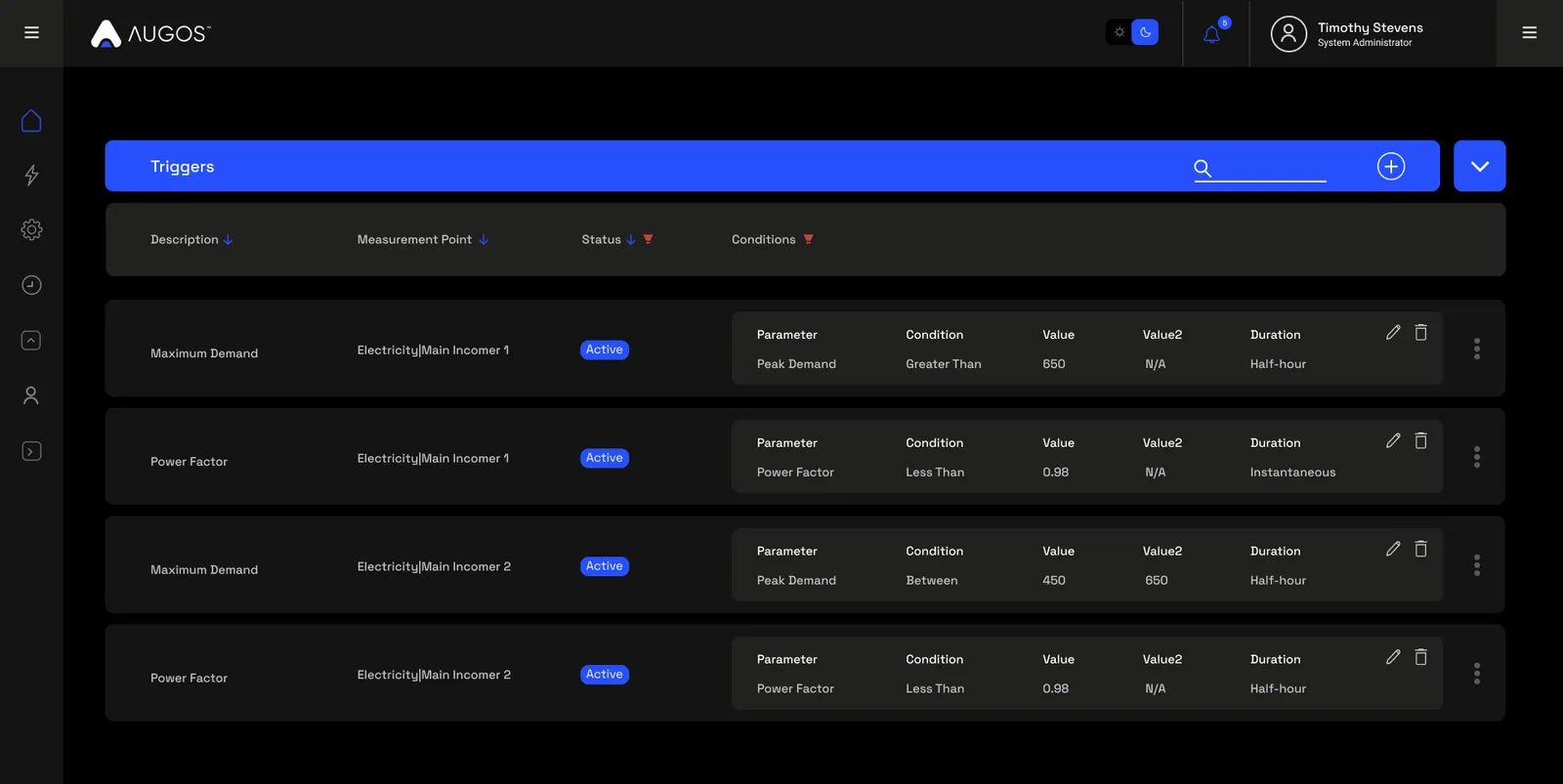
The page opens on a list of every trigger you can see, with a search box in the blue bar. Each row shows a trigger at a glance: what it's watching, the condition it's set to catch, and whether it's currently active. On the right you can edit or delete it, or open the menu for its advanced settings, to manage who gets notified, or to pause it without deleting.
2.2 · Adding a trigger
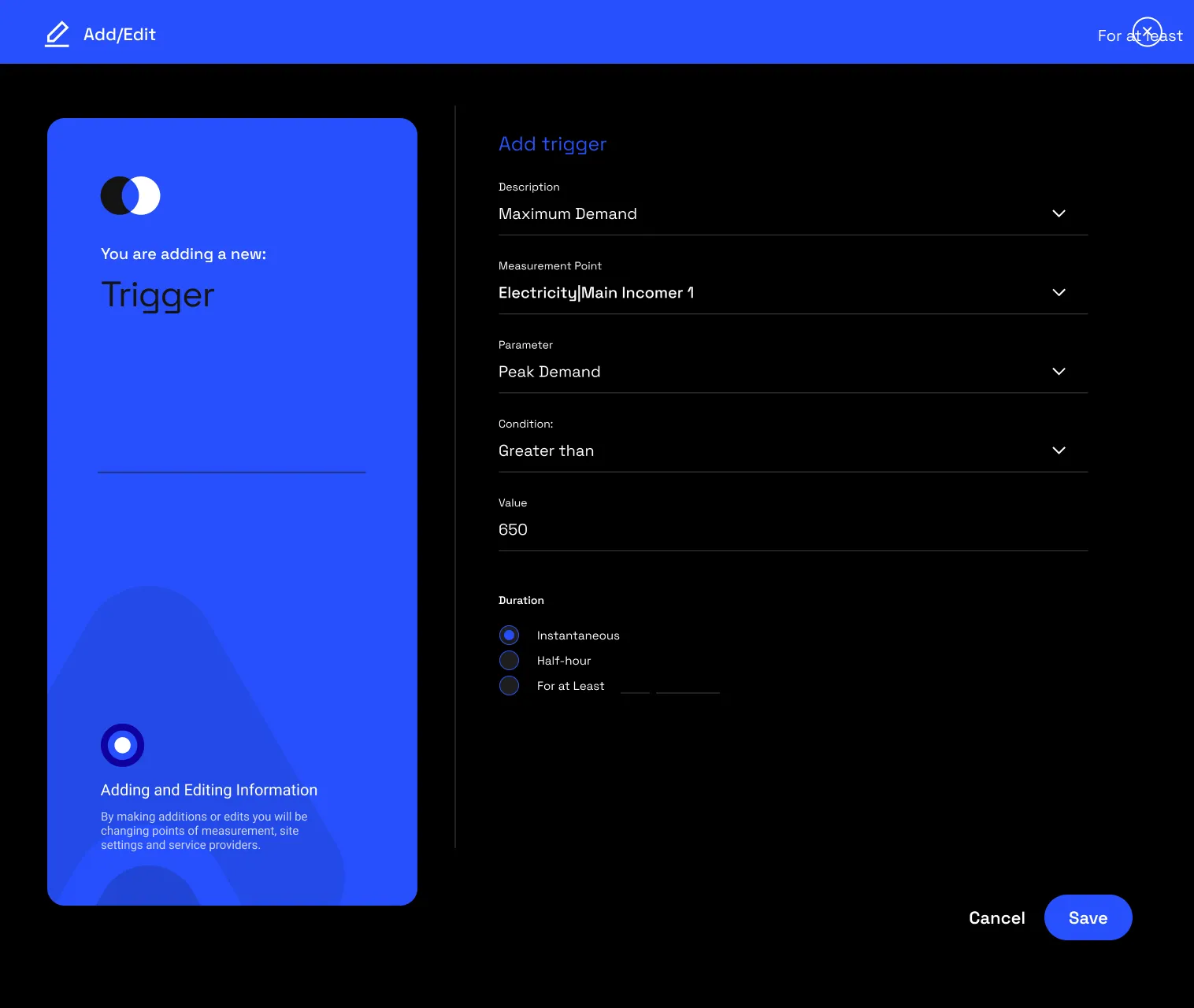
The plus button in the top corner of the blue bar opens the builder, a short form. Fill it in, then tell the platform who to alert:
- Give the trigger a name.
- Pick the measurement point.
- Choose the parameter to watch on it.
- Choose the condition: greater than, less than, equal to or between.
- Set the threshold value the reading has to cross.
- Set how long it has to stay that way before it fires: straight away, over half an hour, or for a number of minutes you set.
- Save the trigger, then open its three-dot menu in the list and choose Manage notifications. Pick the people to alert and how each is told: WhatsApp, SMS or email. Until you do, the trigger fires but nobody receives it.
You can also combine conditions. A trigger might fire only when power factor is low and demand is high at the same time, so a single odd reading on its own won't set it off.
Two settings control what happens after a trigger fires. Recurring keeps reminding you while the problem lasts; leave it off and you're told once. Recovered sends an all-clear when the reading is back to normal.
3 · Use cases
- Catch a real fault. A fridge defrosts on a cycle, so its temperature rises for a few minutes and then settles. Set the trigger to wait ten minutes before it alerts, and those routine spikes go by quietly while a failing compressor still trips it.
- Know when a meter goes quiet. If a meter drops offline for more than a few minutes you'll hear about it, and you'll get the all-clear the moment it reconnects.
- Stay under a demand limit. An alert as demand climbs toward your limit gives the team time to shed non-essential load before a new peak is set for the billing period.
- Spot after-hours load. When power's still high long after everyone's gone home, something's been left running, and you'll know without having to check.
- Find a leak. Put a trigger on a water meter's flow, and an open valve or a burst pipe shows up the moment it starts, not days later.
4 · Exports
- Webhook (JSON). When a trigger fires, it can post the details straight to another system, to open a ticket, say, or hand the alert to your own workflow or an AI agent. More on AI-ready data →
- Alarm log (CSV). The history of what fired and when, exportable for review. More on data download →
5 · Good to know
It's easy to end up with too many alerts. The usual cause is triggers firing on a brief blip, so give a condition a little time to prove itself, and turn on Recovered so alerts clear themselves once things settle. A few well-chosen triggers are worth more than a wall of noisy ones.
A trigger can watch almost anything the hardware measures at a point, right down to whether the meter is still online. You can send the alert to more than one person, and you'll only see the points you've been given access to.
6 · Common questions
How do I avoid alert fatigue?
Use the duration qualifier so a trigger only fires once a condition is sustained, which filters out brief spikes that resolve on their own. Pairing it with recovery logic also closes alerts automatically when things return to normal.
What can a trigger watch?
Any parameter the platform records for that point: electrical metrics (kW, kVA, PF), temperature, flow and pressure, and connectivity state.
What does Recurring do?
On, the trigger re-fires periodically while the condition stays true. Off, it fires once when the threshold is crossed and stays quiet until the condition fully clears.
How are alerts delivered?
Email, SMS, WhatsApp and webhooks. A webhook hands the alert to an external system, so a trigger can kick off automation elsewhere. Recipients and channels are set per trigger under Manage notifications in its three-dot menu.