Operator Analysis
The per-person cut of the loss account, the report behind the Best Operator Benchmark. Every loss category, broken out per operator and per technician, so you can see who to coach, who to learn from, and where attribution is missing.
1 · The purpose of this report
It's the Performance Overview account, grouped by person instead of by phase, the same seconds, sliced by who. Summing all operators reproduces the Performance Overview totals. It supplies the named best-operator benchmark that prices the training opportunity.
2 · On the page
Top to bottom: the controls, then the heatmap, the ranked cards, and the planned/unplanned split. Every tile drills to its stops.
2.1 · Selectors and controls
| Control | What it does |
|---|---|
| Point selector | Choose the site or line whose operators you're scoring. |
| Date selector | Set the period. Person-level figures are noisy on short windows, so favour three months or more. |
| Sort | Order the heatmap by any lever, so the biggest contributor to that loss rises to the top. |
2.2 · The heatmap
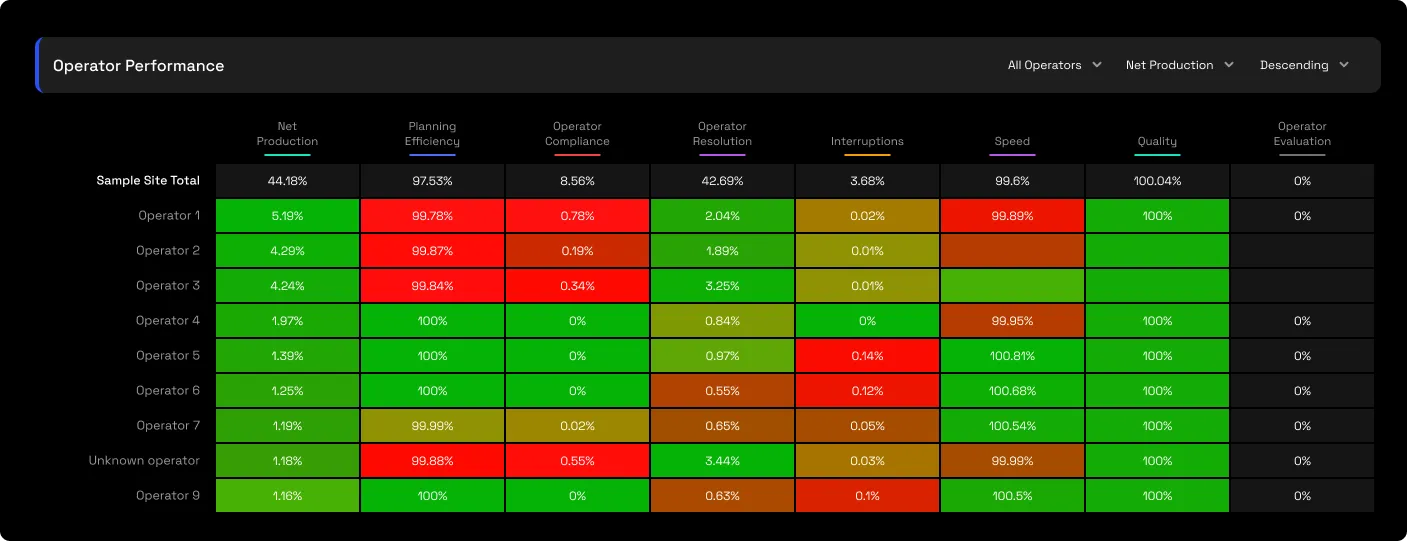
Operators down the side, levers across the top, net production, compliance, resolution, evaluation, speed and quality, colour-coded red to green. The biggest contributor to any loss surfaces at a glance, and clicking any tile drills to that operator-and-lever's contributing stops, dated and noted.
2.3 · Ranked cards
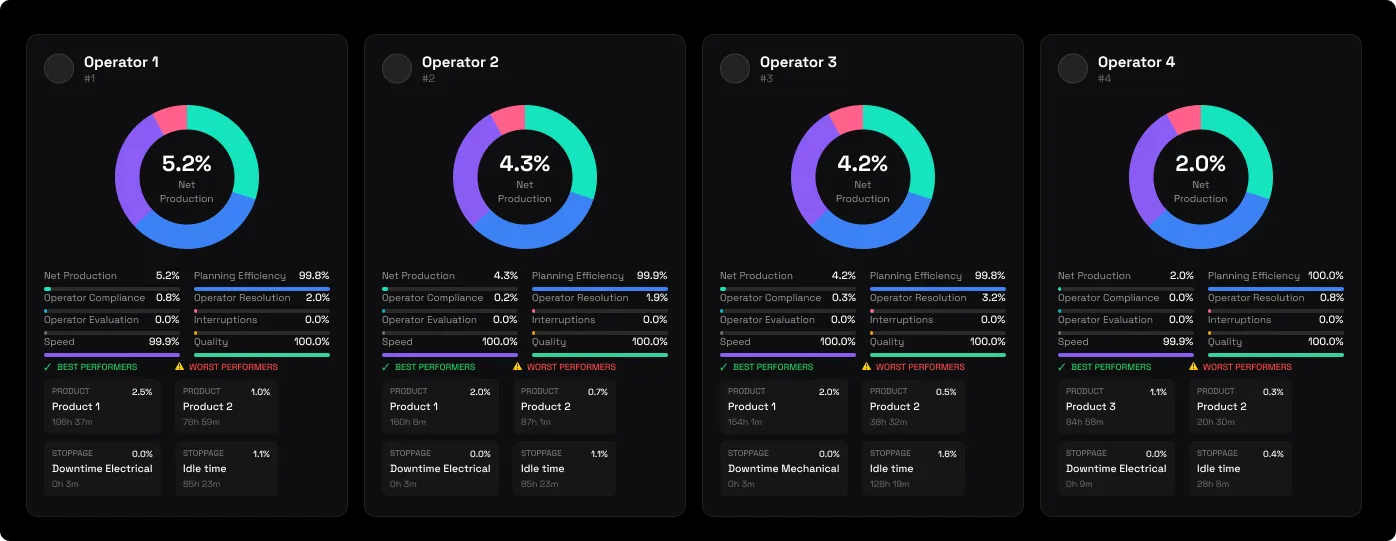
Each operator gets a card: a net-production donut, the lever breakdown, and their best and worst by product and by stoppage. A parallel table covers technicians.
2.4 · The planned / unplanned split
The same per-person account, cut by stop class, so a discipline problem on planned stops reads separately from a resolution problem on unplanned ones.
3 · Use cases
- Coach with evidence, not opinion. The training case is priced, the best operator's pace times everyone's gap equals recoverable hours, and the target is a colleague, not a consultant.
- Find who to learn from. The benchmark operator, high volume, high compliance, is named, and their proven pace becomes the achievable target the whole training case is built on.
- Be fair per task. Compliance is computed per reason, so an operator can be strong on one task and weak on another, no blanket labels.
- Close the attribution gap. An "Unknown operator" bucket shows how much time isn't signed to anyone; shrinking it sharpens every other number on the page.
4 · Good to know
Read compliance against volume: a high share of paid time with low compliance is the coaching target; high volume with high compliance is the benchmark. Because compliance is computed per reason upstream, pair this with the stoppage analyses to see which tasks drag a person's number before any conversation. Use three-month-plus windows, person-level figures are noisy on short ones. An "Unknown operator" row is a sign-on gap at capture, not a report error. And named operators appear throughout, so mask before any external sharing.
5 · Common questions
An operator disputes their results.
Drill down into the stoppage reports and Event Details. The timestamped event log is an audit trail, so you can verify every recorded stop.
What are the "Unknown operator" rows?
Stops that weren't signed to an operator at capture, a sign-on gap tracked in Pending Inputs, not a report error. Fix the attribution rather than deleting the row.